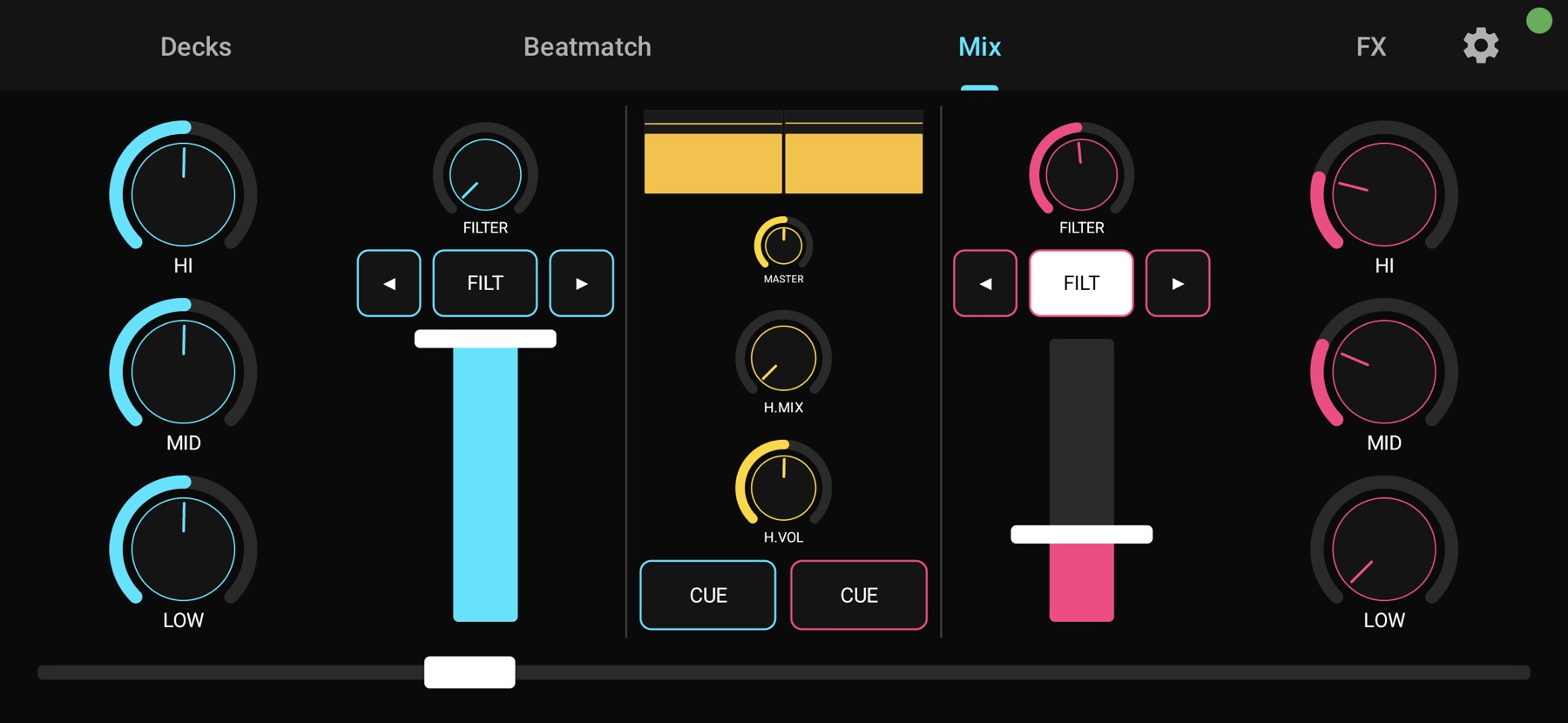
The Mix tab: EQ, filters, faders, master and crossfader on a single screen.
Plug your phone into your computer over USB-C and get 2 decks, jog wheels, EQ, filters, FX and a crossfader. Class-compliant USB MIDI with latency under 10 ms. No additional hardware. Free to use.
The Mix tab: EQ, filters, faders, master and crossfader on a single screen.
MobaDJ uses Android's native USB MIDI peripheral mode to send class-compliant MIDI to your computer. The phone is recognized as a MIDI device, Mixxx loads the included mapping, and you gain a control surface organized around the real workflow of a live mix.
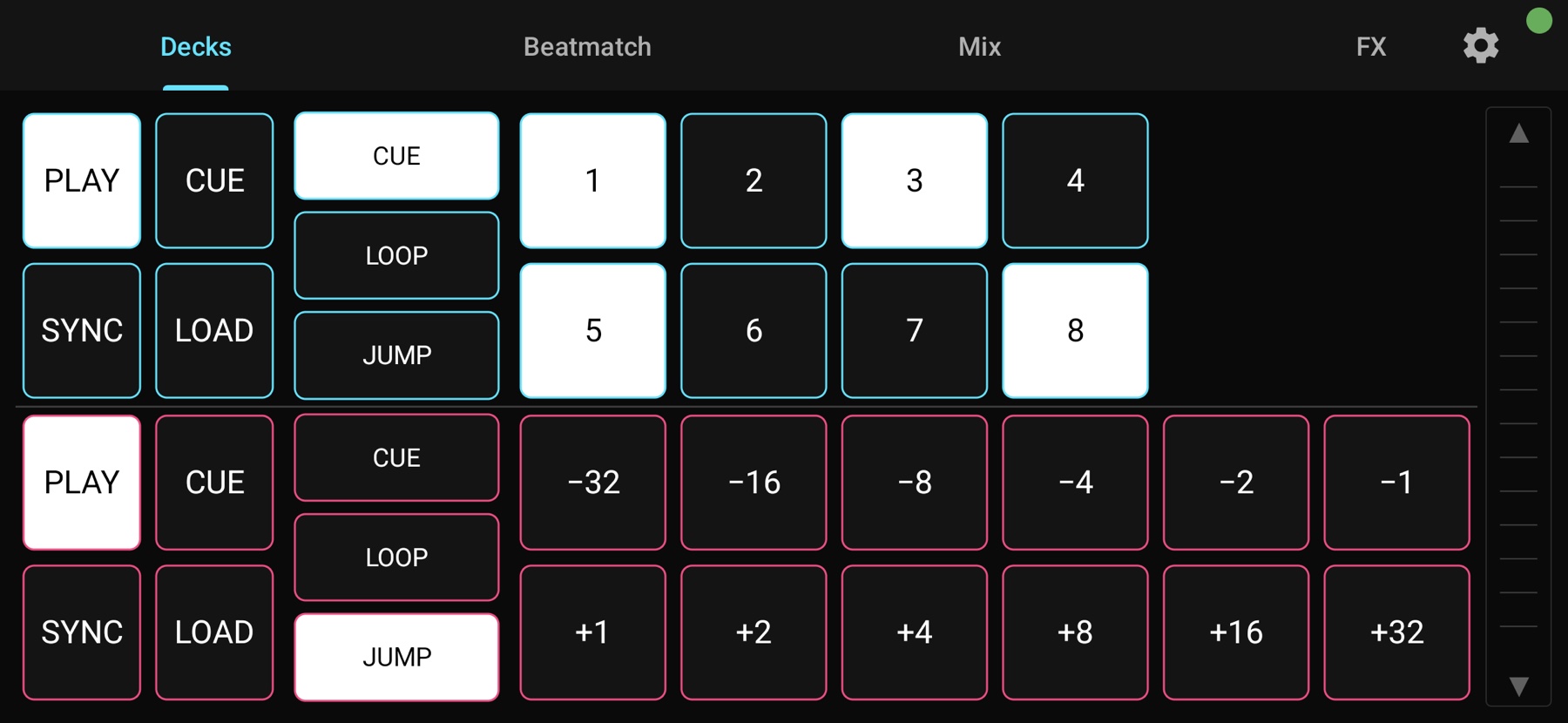
Play / cue / sync / load, 8 hot cues, 9 beatloops, 12 beatjumps, jog with concentric scratch + bend zones, tempo fader with fine nudge.
3-band EQ, filter with chain selector, PFL cue, head mix and volume, master gain and crossfader. Everything on a single screen, with no swiping during the mix.
Three effect slots per deck, with prev/next selectors and dry/wet mix. Slip mode for scratching without losing the beat.
Class-compliant, direct USB MIDI. No Wi-Fi, no Bluetooth pairing, no audio drift.
Pads light up from Mixxx feedback: recorded hot-cue slots, active loop size, PFL state, FX-on, BPM and master VU. The phone reflects the Mixxx state in real time.
The app and the Mixxx mapping are distributed for free. Donations help fund maintenance and expand device compatibility.
Tab order mirrors the real flow of a live mix: Decks (prep and pads), Beatmatch (jog and tempo), Mix (live performance), FX (occasional effects). Tabs change by tap only, never by swipe, so they cannot be triggered accidentally during a scratch. Each tab is detailed below; calibration lives under Tuning.
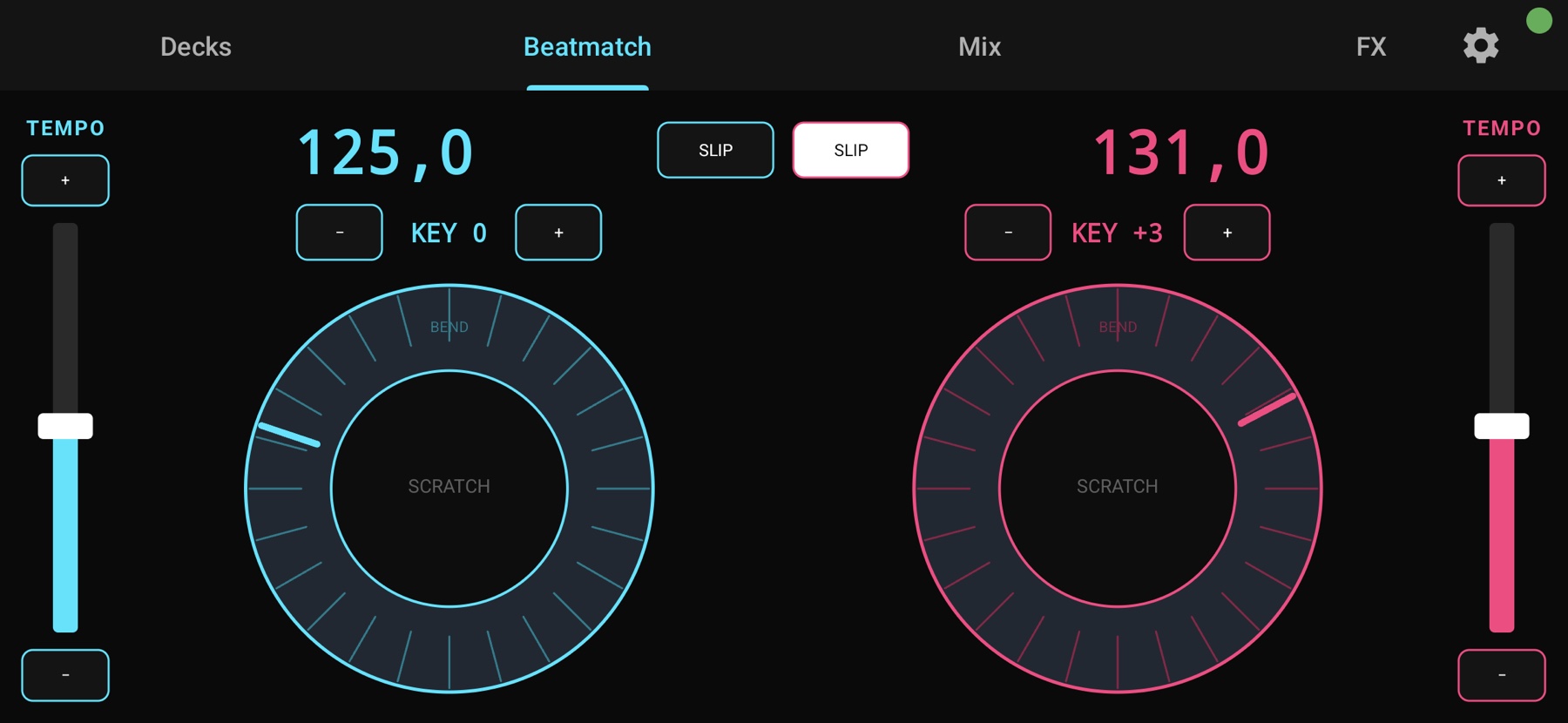
scratchEnable and scratchTick. The outer ring performs subtle pitch bend. The zone where the touch begins stays locked for the entire interaction, preventing accidental mode switches mid-scratch.+ and − pads next to each fader increment or decrement BPM by 0.01.
◀ FILT ▶ row that toggles the chain bypass and cycles through presets (LP/HP, Echo and others) without leaving the app.pfl output, without relying on a local toggle.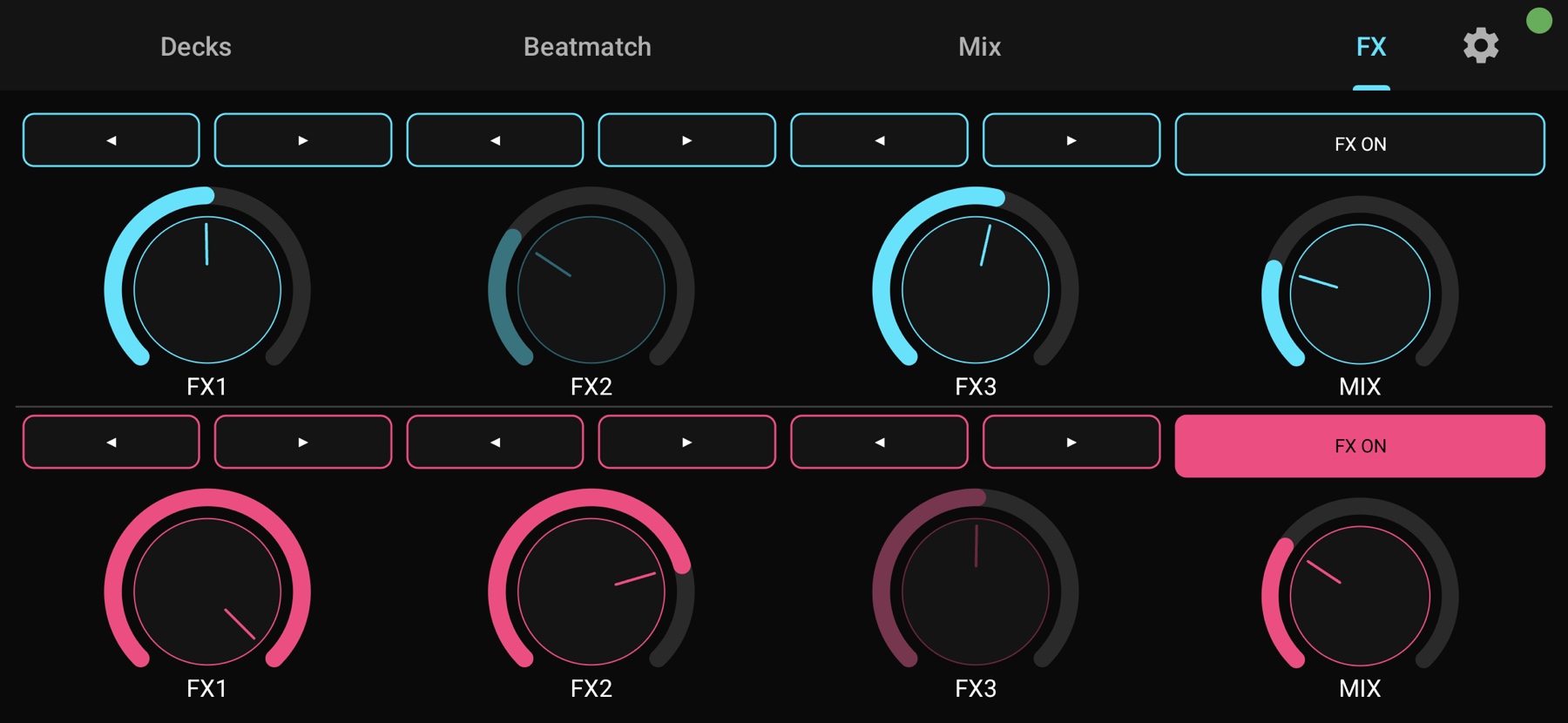
[EffectRack1_EffectUnitN] one-to-one.◀ ▶ arrows above each slot walk through every effect installed in Mixxx.Tap the gear icon at the top right of any tab to open the Settings sheet. Calibrate jog feel and tempo throw without leaving the app or editing the script. Settings persist across sessions.
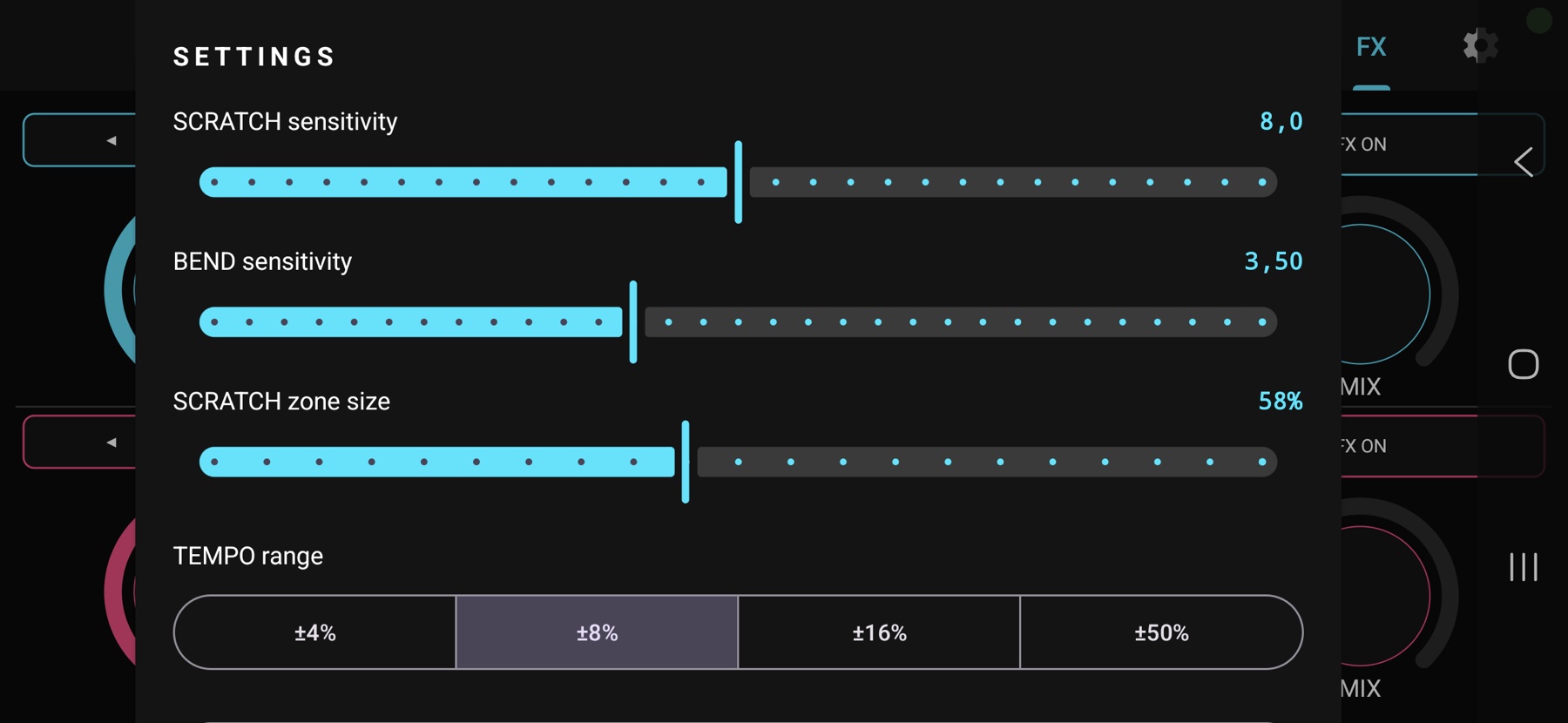
rate_range.MobaDJ requires Android 9 or higher, with USB host support and USB MIDI peripheral mode (Settings → Developer options → Select USB Configuration → MIDI). Most modern Samsung Galaxy and Google Pixel devices are supported; entry-level phones with limited USB OTG may not work.
If you tested MobaDJ on a different device, please submit a quick report with the model and Android version to help grow this list.
Initial setup takes around five minutes. After that, it is plug-and-play.
Connect the phone to your computer over USB-C, using a data cable (charge-only cables do not work). Open the notification bar, tap "Android System · Charging via USB", and select MIDI.
Download the APK using the button at the top of the page, open it in your file manager, and authorize "install from unknown sources" when prompted (an Android requirement for manually installed apps).
Download MobaDJ.midi.xml and MobaDJ.script.js from the Drive folder and copy both files to Mixxx's controllers directory:
~/Library/Application Support/Mixxx/controllers/~/Library/Containers/org.mixxx.mixxx/Data/Library/Application Support/Mixxx/controllers/%APPDATA%\Mixxx\controllers\~/.mixxx/controllers/In Mixxx, open Preferences → Controllers, select SAMSUNG_Android, open "Load Mapping", choose MobaDJ, tick Enabled and confirm with OK.
A Mixxx controller mapping is not drag-and-drop: it combines XML bindings with custom JavaScript for everything Mixxx cannot express declaratively. The MobaDJ mapping is hand-tuned, validated in real use and ready to load. Simply copy two files into the Mixxx controllers folder.
<button /> does not release on a second tap. The mapping wraps the control in a JavaScript handler that ignores release events and triggers reloop_toggle when a loop is active.scratchEnable and scratchTick; the outer ring applies the delta as pitch bend. The zone is latched at the start of the touch, allowing the finger to drift without switching mode.Building a mapping of this caliber from scratch requires hours of reading through the Mixxx engine documentation before the jog reaches a usable feel. The MobaDJ mapping delivers that work ready to use. If the project saved you time, consider supporting it with a donation.
If MobaDJ replaced a hardware controller for you, consider supporting the project. Donations fund maintenance, compatibility testing with new devices and the continued evolution of the Mixxx mapping.
International card payment, with no account required. No platform commission; only standard Stripe fees apply.
Open Ko-fi →Instant, fee-free transfer. Use your bank app to send to the email key below.
digital@onvibes.com.br
A single form covers everything: bug reports, feature suggestions and device-compatibility entries (model, Android version, outcome). It requires no login or account, and sends no automated messages in return.
Direct distribution keeps the app fully free, without a paywall, and avoids the mandatory closed-test step required by the Play Store for new personal accounts (12 testers for 14 days). A free listing may be added later, purely for discoverability. The official source will remain mobadj.com.
No. The app sends MIDI bytes locally over USB to your computer; no data leaves the device. The only network call is an optional, manual check for new releases, triggered from the About screen inside the app itself. Full details in PRIVACY.
No. iOS does not expose USB MIDI peripheral mode the way Android does; an iOS app would need to act as a MIDI host, which does not address the scenario where the computer is the host. MobaDJ is Android only because of this platform constraint.
Latency. BLE-MIDI typically operates between 30 and 60 ms, with jitter, which is unacceptable for scratching and beatmatching. USB-C is class-compliant, keeps latency under 10 ms, requires no pairing and does not consume battery unpredictably during a set.
Mixxx already covers this case natively. In CUE mode, set a hot cue while a loop is active; Mixxx automatically stores the loop's in/out positions on that cue. Triggering the cue later jumps to the position and reactivates the loop with the same bounds, without requiring any additional app feature.
For day-to-day adjustments (jog feel, tempo range), use the Settings sheet inside the app, described under Tuning. For deeper changes (remapping a button, changing which Mixxx control a knob targets, or rewriting the jog math), edit the MobaDJ.midi.xml and MobaDJ.script.js files available in the Drive folder. Mixxx reloads the script when you toggle Disable and Enable on the controller in Preferences.
Use the feedback form, which covers bugs, feature requests and compatibility reports. Alternatively, send an email to digital@mobadj.com.
Free APK and mapping. Donations sustain maintenance and continued updates.